Utilizing Competencies
Competencies can be a powerful tool to help your organization see who currently has what skills, and who has gaps in skills needed for their current role or potential future roles.
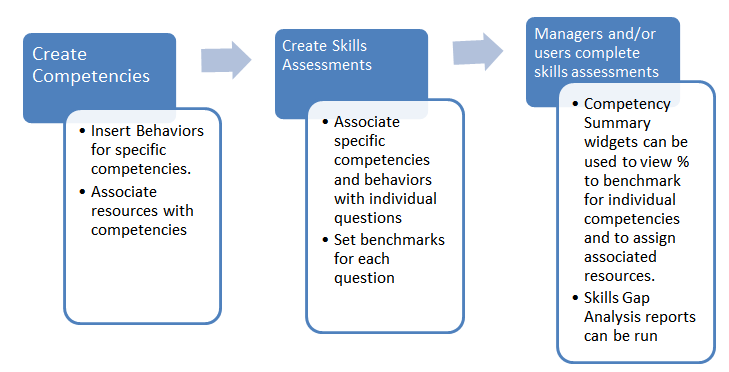
The chart below shows how competencies can be used in the Talent Management System.
Competency Summary Widgets
The Competency Summary widget allows a manager to see their team’s overall progress on various competencies. The Team Competency Summary widget allows a manager to clearly see each individual on their team and that person’s progress on each competency.
The graphs displayed on these widgets are developed based on the results of the Skills Assessments completed by the manager and the individuals on their team. Each time a skills assessment is completed, the overall values will automatically adjust. Each graph represents an overall average of percentage to benchmark based on all submitted skills assessments for the team/ individual.
Pictured below is the Competency Summary widget. It shows an overall summary of the team’s progress on two competencies.
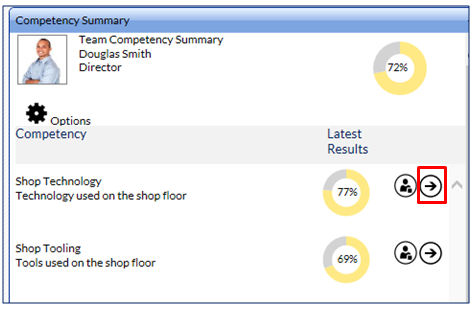
Click on the arrow to see the percentage to benchmark of the individual behaviors that compromise the competency.
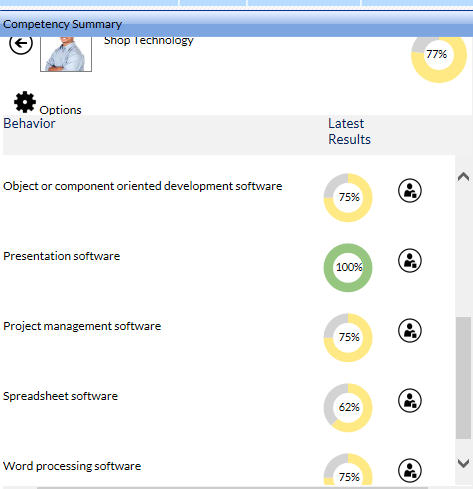
Click on the Person icon next to each graph to see the individual benchmark scores for each person on the team (that is, everyone who has completed a skills assessment on the selected behavior).
The Team Competency Summary widget is pictured below. The summary view shows each individual’s progress on all competencies on which they have been assessed.
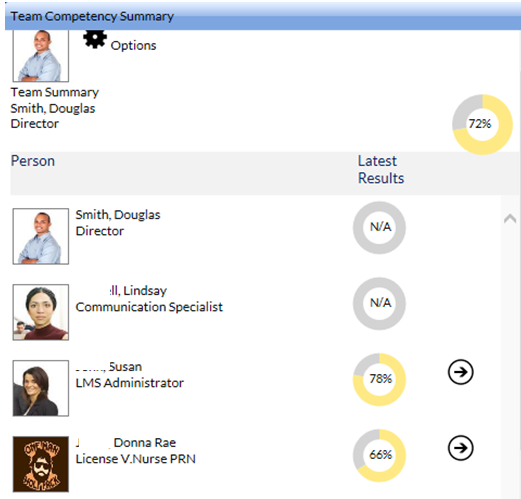
The manager can click on the arrow to drill down and see the individual’s progress on each competency and each behavior.
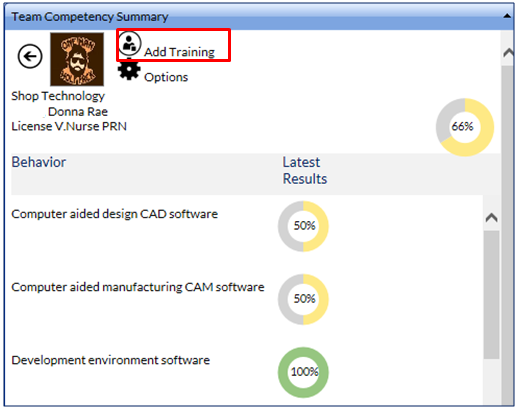
The Add Training option can be used to view and enroll an employee in any recommended training to help fill the gap.